Our shared open infrastructure platform
A network of community hubs with everything they need for data-driven discovery
Each community gets their own hub with the tools, data, and computing resources for their work. Behind the scenes, we operate shared infrastructure so improvements benefit everyone and flow back to open source. Our commitment to open source means you can replicate your infrastructure anywhere, with or without us.
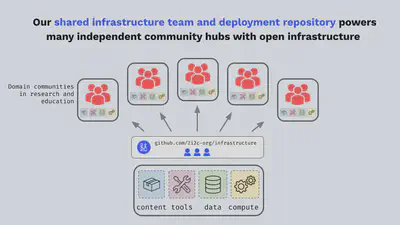
Every community hub is built entirely with open tools and infrastructure, and we support open source communities as part of our membership service. Below are the features and customization options that come with each hub.
Sign-in
We support the following authentication and authorization options:
- GitHub - with support for GitHub Organization and Teams
- CILogon - with support for institutional logins, Google Auth, Microsoft, and ORCID
- Shared Password - simple authentication with a global shared password, ideal for workshops and webinars
- Other providers - we also run direct Google sign-in and other standard single-sign-on providers. Ask us about yours.
See it in practice: University of Toronto students signing in with their university accounts.

Compute
We offer a choice of CPU, Memory (from 4GB to 512GB) and GPU configurations for all types of workloads, with added support for Dask Gateway for task parallelization.
We can also co-locate your hub’s compute next to your cloud data to improve performance and costs, with AWS and Google Cloud Platform supported out-of-the-box, and Azure configurations available on request.
See it in practice: EarthScope scaling GNSS processing with Dask and GPUs for a CloudBank classroom.


User interface
JupyterLab provides a flexible interface to create and explore notebooks, interactive visualizations, and computational narratives.
See it in practice: NASA VEDA’s launch page with notebooks, RStudio, VS Code, and a desktop.
 and
and  .
.Software stack
Community leaders can offer multiple environments to fit different workflows. We support standard community-maintained images including Pangeo Notebook, SciPy, Julia, and Rocker with RStudio.
and  .
.Hub users can also configure hubs with any pre-built image from Docker Hub or quay.io, or provide their own self-maintained images. Users can even build environments themselves from a GitHub repository, right from the hub.



See it in practice: CryoCloud’s shared environment and tutorials.
Storage
Hubs can be configured with a choice of persistent home directories and different levels of read-write permissions (admins only, or everyone).
Additionally, object storage can be configured for access to scratch, persistent, or pre-existing buckets, as needed.
See it in practice: managing home directories for thousands of students at the University of Toronto.
Sharing
Learning and discovery through interactive cloud computing are more powerful when shared.
You can choose to let your hub users share their fully interactive projects through ephemeral hubs generated on the fly, giving others the opportunity to experience their work in full by simply clicking on a shared link.
See it in practice: Project Pythia’s runnable cookbooks.
and . Example from the Spyglass toolbox paper.Knowledge base
Shared knowledge bases allow communities to contribute their ideas and work to a shared space that is accessible to the community.
See it in practice: the CryoCloud book of tutorials and hub guides.
 and . Example from the CryoCloud JupyterBook.
Desktop applications
You can provide users a full linux UI that provides access to GUI applications via the web.
See it in practice: QGIS on a desktop at NASA VEDA.
. Example from the NASA VEDA project.Reporting and quotas
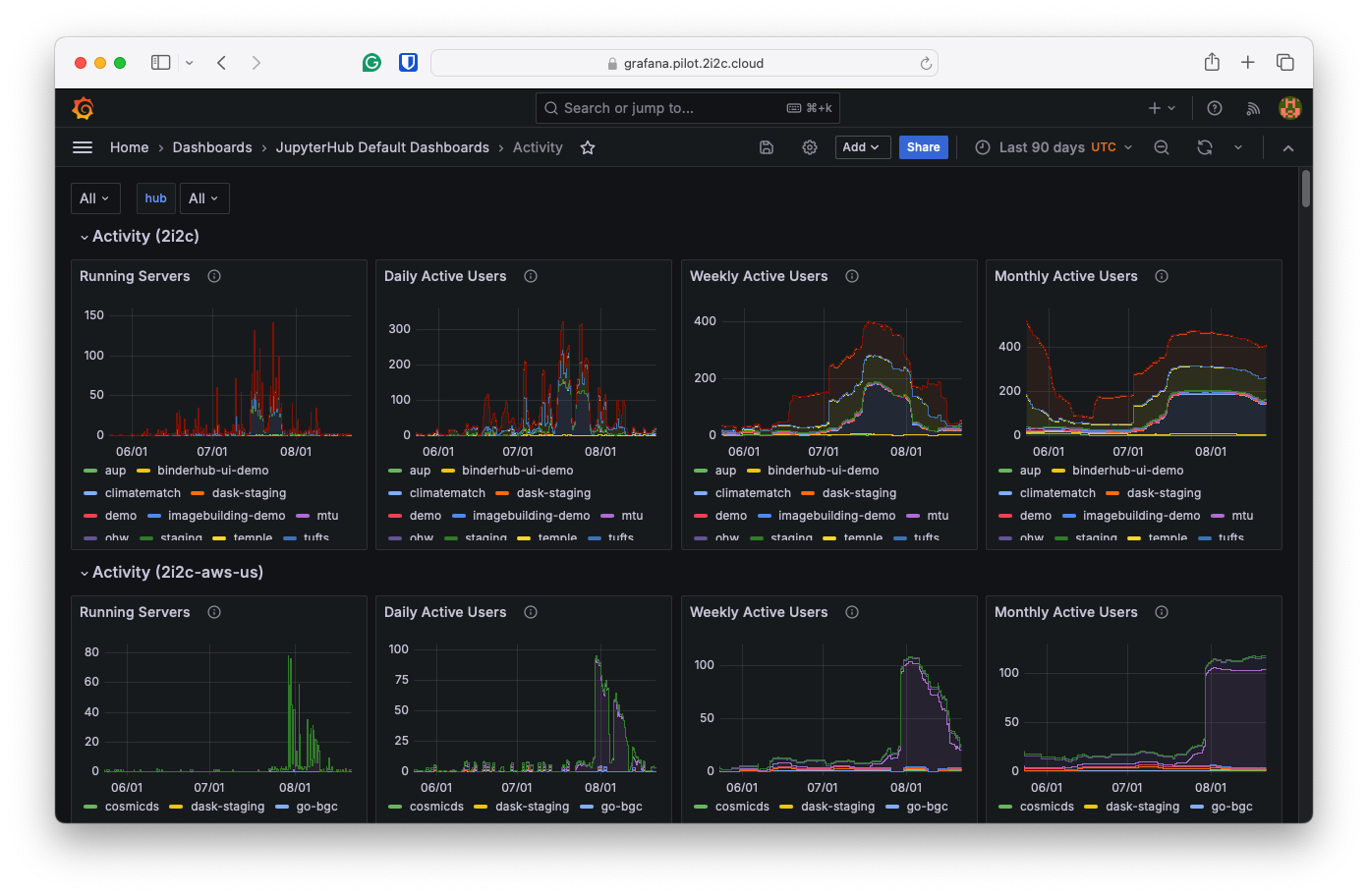
Our hubs come standard with Grafana access to help users and administrators keep an eye on their usage and cost analytics, which together with configurable storage quotas help ensure that cost overruns and unexpected bill shocks are a thing of the past.
See it in practice: Openscapes pricing a workflow at 74 cents.
Community branding and white labeling
Looking to customize your hub’s look and feel to match your community? We can give your hub a unique look to match your message and mission, with a customizable landing page, branding, and announcements area.
See it in practice: the University of Toronto’s branded landing page.
Join our community network
Or learn more about membership to understand how our network works.